iSpy Connect
  • Login
  • Home
  • Download
    • iSpy
    • iSpy Camera Server
    • Plugins
    • Gadgets
    • MediaPortal Extension
    • Android App
    • Windows 8 App
    • Source Code
  • Features
    • Feature List
    • Screenshots
    • Video Overview
    • Mobile Access
    • Gadgets
    • MediaPortal Extension
    • Embedding Options
    • Talk Functions
    • ALPR (license plates)
  • Help
    • User Guide
    • Connecting Cameras
    • Forums
    • Using iSpy Server
    • Connecting iSpy
    • SMS Numbers
    • Remote Access
  • Shop
    • Subscribe
    • Gift iSpy Subscription
    • Spy Equipment
    • iSpy Stickers
  • About
    • About iSpy
    • Testimonials
    • Contact
    • Pricing
    • Privacy
    • Security
    • Rebranding (FREE!)
    • Hosting iSpyConnect
    • Affiliates

MediaPortal Integration

We've written a MediaPortal extension (Download) that enables you to view and control your cameras from your HTPCs. You will of course need iSpy installed and running on your network to use the plugin.

Setting it up

You will need to download and install MediaPortal on a computer around your home and then install the iSpy extension (More Info). You will also need to install the LAVFilters package (the iSpy Extension should prompt you to do this). If you have problems playing back video then check that the video codec in MediaPortal configuration for H264 playback is set to "ffdshow".

Choose your iSpy computer

When opening the iSpy plugin you will see a list of the available iSpy computers that you added above. This view auto-rotates all the live cameras running on the selected server on a 5 second interval.

Choose your cameras

Click to select your computer and then click the button at the bottom left to choose cameras running on that computer.
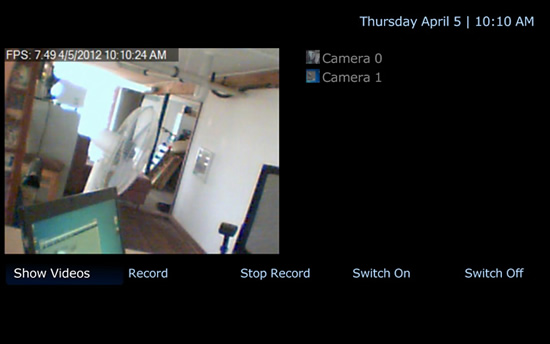
When you have chosen a camera you can then start and stop it or record on demand from the buttons underneath.

View your saved content

Click the button at bottom left to view any content saved by the camera
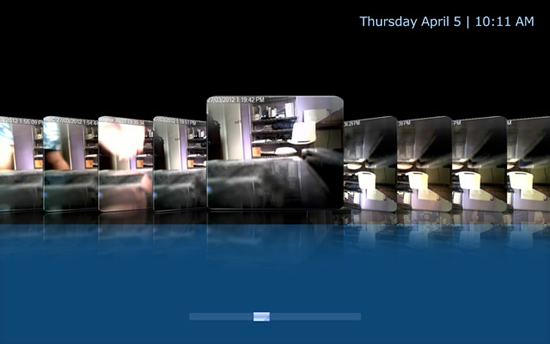
  • Introduction
    • Introduction
    • Supported Operating Systems
    • Recommended Hardware
    • Performance Tips
    • Networking Considerations
    • Choosing Cameras and Microphones
  • Placing Cameras and Microphones
    • Placing Cameras and Microphones
    • Covert Surveillance
    • Overt Surveillance
  • Installing iSpy
    • Installing iSpy
    • .Net Framework 4 Client
    • VLC
  • Using iSpy Server
    • Using iSpy Server
    • Installing iSpy Server
    • Connecting to iSpy Server
    • Troubleshooting Connections
  • iSpy Overview
    • iSpy Overview
    • The iSpy Surface
    • Loading and Saving
    • Adding and Editing Objects
    • Remote Commands
    • Home Automation
    • Remote Control (Device)
    • Keyboard Control
    • Command Line Access
    • HTTP Access
    • Twine Integration
    • MediaPortal Integration
    • Settings
      • Settings
      • Languages
      • Password Protection
      • Opacity
      • Colors
      • Storage Management
      • YouTube Synchronisation
      • Timeouts
      • IP Access
      • Talk
      • Joysticks
    • Log Files
    • Clearing Stored Content
    • Checking For Updates
    • Scheduling
    • Layouts
    • Online Help
  • Configuring Web Access
    • Configuring Web Access
    • Connecting Locally
    • Connecting Remotely
    • Setting up Port Forwarding
    • Using DynDNS.org
    • Troubleshooting Connections
  • Gadgets
    • Gadgets
    • Windows Sidebar Gadget
    • iGoogle Gadget
  • Connecting Cameras to iSpy:
    • Connecting Cameras to iSpy:
    • USB Cameras (Local Device)
    • USB Cameras running on other computers (via iSpy Server)
    • MJPEG and JPEG IP Cameras
    • MP4, ASF, RTSP and other IP Camera Sources via VLC
    • Capture devices and other devices via VLC
    • Monitoring the Windows Desktop
    • XIMEA
    • Kinect
    • Finding Camera URLs with Fiddler/ WireShark
  • Camera Settings
    • Camera Settings
    • Main Settings
    • Talk
    • Setting up Motion Detection
      • Setting up Motion Detection
      • Detector Types
      • Sensitivity
      • HSL (colour) Filtering
      • Display Styles
      • Motion Zones
    • Alerts
      • Alerts
      • Movement Alerts
      • No Movement Alerts
      • Face Alerts
      • License Plate Recognition
      • Overlay
    • Web services
      • Web services
      • Email Alerts with Framegrabs
      • Disconnection Alerts
      • SMS Alerts
      • MMS Alerts
      • Access Groups
    • Recording Settings
      • Recording Settings
      • Timelapse Recording
      • Video Conversion Settings
    • Pan Tilt and Zoom (PTZ)
      • Pan Tilt and Zoom (PTZ)
      • Adding PTZ Support for Unlisted Cameras
      • Automated Tracking
    • FTP
    • YouTube
    • Scheduling
  • Connecting Microphones
    • Connecting Microphones
    • USB Microphones
    • IP Camera Microphones via VLC
    • USB Microphones running on other computers (iSpy Server)
    • Pairing Microphones with Cameras
  • Microphone Settings
    • Microphone Settings
    • Main Settings
    • Sensitivity
    • Alerts
    • Web services
    • Email Alerts
    • Disconnection Alerts
    • SMS Alerts
    • Recording Settings
    • Audio Conversion Settings
    • Scheduling
    • Listen Live
  • Floorplans
  • iSpyConnect
    • iSpyConnect
    • Account Settings
    • Disconnection Alerts
    • Permissions
    • Tracking Usage
    • Searching, Filtering and Ordering Content
    • Viewing Content Online
    • Changing Configuration Settings Remotely
    • Switching Alerts On or Off
    • Using PTZ Remotely
    • Live Feeds
    • Playback of Captured Content
    • YouTube Upload and Email
    • Using Activity Graphs
    • Using the File Browser
    • Embedding Cameras in your Website
    • Embedding iSpyConnect in your Website
    • Viewing Multiple Cameras Simultaneously
    • Using Floorplans
    • Live Floorplan Alerts
    • Connecting Multiple Computers to One Account
    • Mobile Device Access
    • iPhone/ Android/ Windows 7
    • iPad / Tablets
  • Google Drive
  • Host iSpy for your Customers
  • Further Help and Troubleshooting
  • Remote Access Troubleshooting
 
© Developerinabox 2012 | Privacy Policy | Security | Contact Us | Integrators | Affiliates