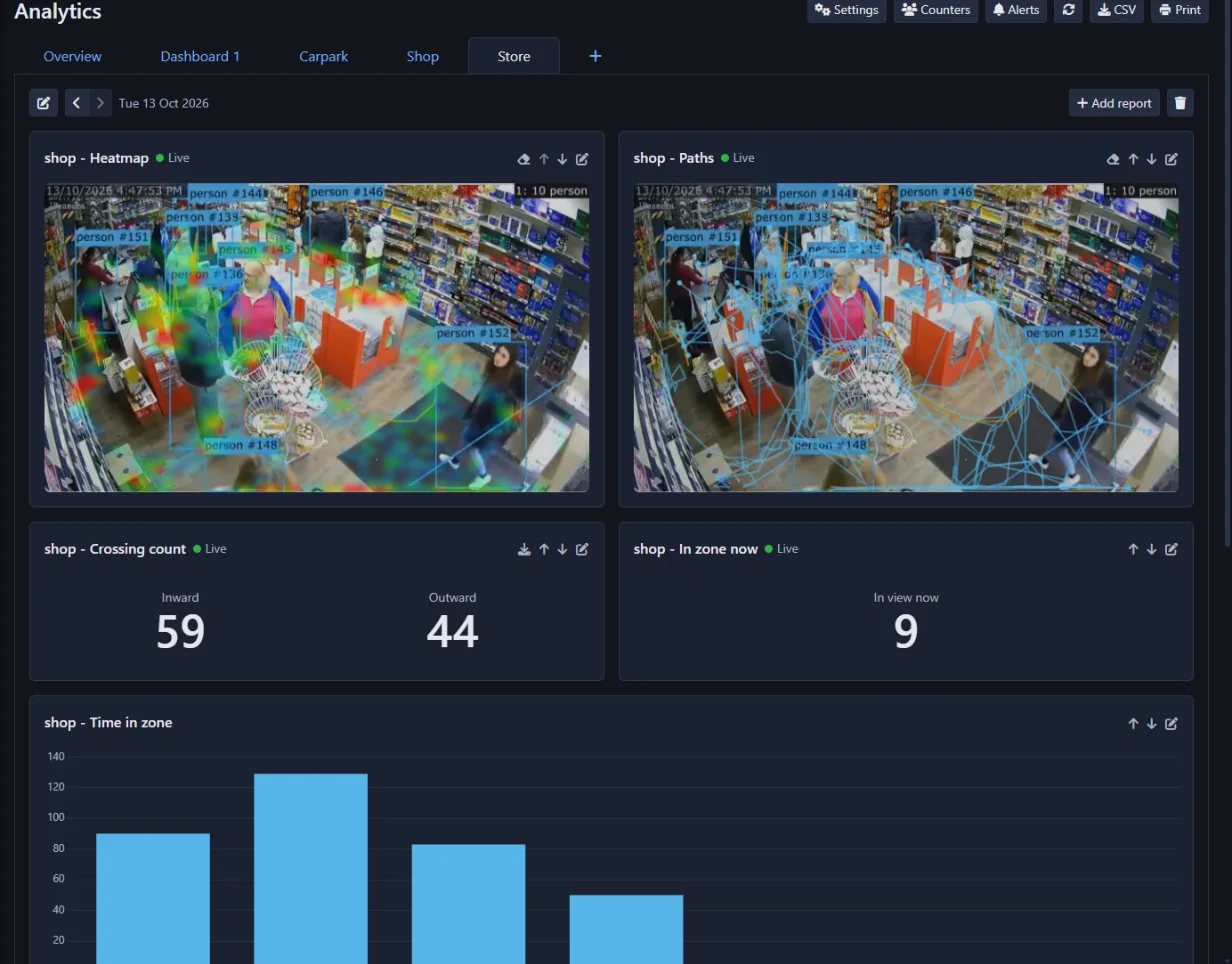
Know what happens in front of your cameras
A security camera tells you what happened. Analytics tells you how much, how often and for how long. Draw a line across a doorway and you have a footfall counter. Paint a zone over the tills and you have a queue monitor. Paint the shop floor and you can see which displays people stop at and which they walk past.
Everything is counted by Agent DVR's built-in AI on your own computer, from any IP, ONVIF, RTSP or USB camera. No special counting cameras, no sensors over the door and no per-camera cloud fee.
Footfall, heatmaps, queues and occupancy
People and vehicles in and out
Counting lines for doors, gates, corridors and roads. Every crossing is counted in each direction, by the hour or the day, for people, cars, trucks, bicycles and more.
Heatmaps
See where people spend their time, drawn over the camera's live picture: red where they stop, blue where they pass, nothing where they never go.
Paths
The routes people take across the floor, so you can see how they move through a shop, a lobby or a yard.
Queues and waiting
The longest queue in each hour and how long people waited. Only people who actually wait are counted, not those walking past.
Time spent
Visits to each zone with the average and median time, and a chart of how many stayed seconds, a minute or a quarter of an hour.
Occupancy
A running count of how many are inside, fed by every entrance and exit, even on different cameras. Set a capacity and see the free spaces.
Busy times
Your busy hours across the week at a glance, to plan staffing and opening times around what really happens.
Speed
Time vehicles between two lines a known distance apart for an average and top speed, written on the live video as it happens.
Retail analytics, queue management and occupancy monitoring

Which displays earn their floor space
A heatmap of the shop floor shows where customers stop and where they do not. Paint a zone on an aisle or a promotion and compare visits and time spent before and after you move it.
Read the user guide
Open another till before the queue walks out
Watch the queue at the tills, the counter or the reception desk. Get a notification, an email or a call to your own system when more than a few people have been waiting, during opening hours only.
Read the user guide
Which bays are taken, and for how long
Paint a zone on each bay to see at a glance which are free, how long vehicles stay, and to be told when someone parks in a reserved or loading bay.
Read the user guide
Never guess how many are inside
Count every door of a shop, a venue or a car park into one number with a capacity. See how full it was through the day and act when it is nearly full.
Read the user guide
A screen at the door that says come in or wait
Put a tablet or a TV at the entrance. It shows your own message in green while there is room and turns red the moment the place is full, with no staff needed on the door.
Read the user guideSet up people counting in a few minutes
Switch it on for a camera
Open Analytics in Agent DVR, choose a camera and enable it. Agent DVR downloads the detection model it needs by itself.
Draw lines and zones
Drag a line across each doorway or road and paint a zone over each area you care about. Name them so the reports read the way you think.
Build a dashboard
Pick the reports you want - counts, charts, heatmaps, live figures - and arrange them. Every camera also has a ready-made overview from the first minute.
Alerts, reports and integrations
Alerts
Be told when a queue is too long, someone loiters, a line is crossed the wrong way, someone follows another person through a door, a speed limit is broken or a place is nearly full. By notification, email or a call to your own system, during the hours you choose.
Reports by email
Have a dashboard emailed every morning or every Monday, figures and heatmaps included.
Export and print
Download any report as CSV for a spreadsheet, or print a dashboard or save it as a PDF.
API and AI assistants
Read every count from your own software through the API, or just ask Claude or ChatGPT how many people came in yesterday.
Your data stays yours
Video never leaves your network. Counts are kept on your own computer for as long as you choose.
Works with what you have
Any camera Agent DVR supports, on Windows, macOS, Linux, Docker or a Raspberry Pi. Use a GPU when you are counting on many cameras.
People counting questions
Do I need special people counting cameras?
No. Analytics works with ordinary IP, ONVIF, RTSP and USB cameras. A camera mounted high and looking down gives the best counts, because people hide each other less.
Is my video sent to the cloud?
No. Detection and counting run on your own computer using Agent DVR's built-in AI. No video or images are uploaded, and the counts are stored locally.
How accurate is it?
It depends on the view. With a camera looking down on a doorway where people cross one at a time, counts are close to what a person would count by hand. Crowds, a low camera where people hide behind each other, and poor light all reduce accuracy. The overlay shows exactly what is being tracked, so you can check it against what you see.
Can it count across several cameras and entrances?
Yes. A report can add up lines and zones from different cameras, and an occupancy counter takes every entrance and exit of a building into one running count.
Which plans include Analytics?
Analytics is included in the Standard and Professional plans, from $14.95 a month. It is not part of the Basic plan or the free version. Compare plans.
What can it count?
People, cars, trucks, buses, motorcycles, bicycles and the other objects Agent DVR's built-in model recognises. You choose which to count on each camera, and reports can be broken down by object type.
How much computer do I need?
A modern desktop CPU handles a few cameras. For more, switch on GPU processing. You can lower the detection rate on each camera to reduce the load.
Full instructions, with worked examples for shops, queues, car parks and capacity limits, are in the user guide.