iSpyConnect's community-maintained database lists 1 Sweex camera model with 6 crowd-sourced connection URLs. Sweex cameras connect using HTTP, typically on port 80. Connection data is crowd-sourced from the community and updated daily.

1 modelHTTPPort 80Updated 9 Jun 2026
Agent DVR is free for personal, local use. Download Now Remote access or business use → Pricing

Sweex connection URLs

Tip: Click a model to generate a video connection URL for your Sweex camera

Models Type Protocol URL
UnknownFFMPEGHTTP/videostream.asf
UnknownJPEGHTTP/snapshot.cgi?user=[USERNAME]&pwd=[PASSWORD]
UnknownJPEGHTTP/Jpeg/CamImg.jpg
UnknownMJPEGHTTP/GetData.cgi?Status=0
UnknownJPEGHTTP/GetData.cgi
UnknownMJPEGHTTP/GetData.cgi?CH=[CHANNEL]&Codec=jpeg&Size=[WIDTH]x[HEIGHT]
Page
1

* iSpyConnect has no affiliation, connection, or association with Sweex’s products. The connection details provided here are crowd sourced from the community and may be incomplete, inaccurate or out of date. We provide no guarantee or warranty that you will be able to connect to your cameras using these URLs.
How to connect Sweex cameras to Agent DVR

  1. Download and install Agent DVR — free for local use on Windows, macOS, Linux, Docker and Raspberry Pi.
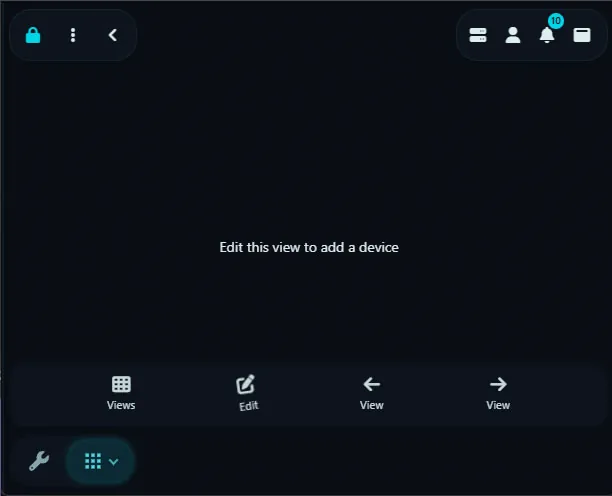
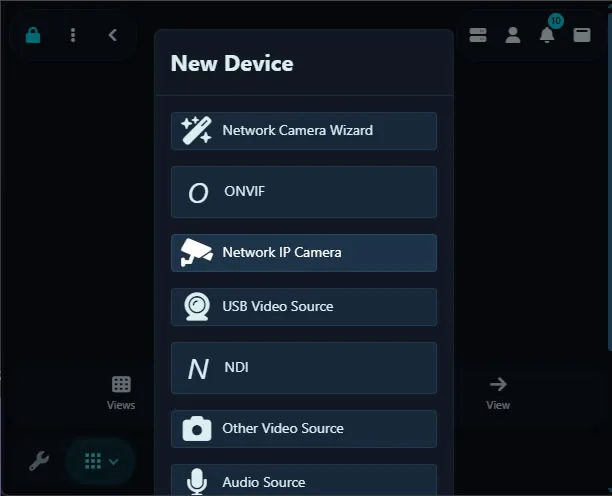
  2. Open Agent DVR in your browser and click the + (Add) button, then choose "IP Camera Wizard".
  3. Select Sweex from the manufacturer list.
  4. Enter your camera's IP address, username and password. These stay on your machine and are never sent to iSpyConnect.
  5. Pick the HTTP connection URL (default port 80) and save. Agent DVR begins live streaming, motion detection and recording.

Sweex Camera FAQ

How many Sweex camera models does iSpyConnect support?

iSpyConnect's crowd-sourced database lists 1 Sweex model with 6 connection URLs, updated daily by the community.

What is the connection URL for Sweex cameras?

Sweex cameras typically connect over HTTP on port 80. Click any model in the table above to generate the exact URL with your IP address, username and password.

Do Sweex cameras support ONVIF?

It varies by model. If your Sweex camera supports ONVIF, Agent DVR can auto-discover it; otherwise use a direct HTTP URL from the table above.

How do I connect Sweex cameras to Agent DVR?

Install Agent DVR (free), click the + button, choose the IP Camera Wizard, select Sweex, enter your camera's IP address, username and password, then pick a connection URL. Agent DVR starts live streaming, motion detection and recording immediately.


Other makes starting with "S"
SS.vision, S3vc, Saance, Sab, Sacam, Saewit, Safecam, Safehome, Safer, Safesky Cn, Safevant, Safire, Samgane, Samsco, Samsung, Sanan-cctv, Sanetron, Sannce, Sansco, Santachi, Santec-video, Sanyo, Sanzio, Saocom, Saphire, Sapsan, Saqicam, Sarmatt, Sarotech, Sas Digital, Satvision, Savitmicro, Savvypixel, Sawyobi, Saxxon, Sayus, Scada Technology, Scancam, Schlage, Schneider, Scout Cctv, Scs, Scsi, Scv3, Scw, Sdc, Sdeter, Sea Wit, Secam Cctv, Seccam, Sectec, Secu First, Secueasy, Seculink, Secuon, Secuplug, Secur Eye, Secur360, Securecam, Securia Pro, Securicom Tunisie, Security, Security Cam, Security Camera 2000, Security Camera Warehouse, Security Labs, Securitytronix, Securix, Secuvision, Seecam, Seecom, Seedary, Seenergy, Seesoon, Seetong, Sefica, Seif, Seimem, Seisa, Seisatek, Selea, Semac, Senao, Sensormatic, Sentient Pro, Sentry 360, Sentryview, Sentul, Sepcam, Septekon, Sequrecam, Serage, Serang, Sercam, Sercomm, Serioux, Sertek, Ses, Sesco Security, Seteye, Setik, Seven Systems, Sgs, Shamim, Shany, Sharx Security, Shenwhen Neo Electronic Co, Shenzhen, Shenzhen Reecam Tech.ltd., Shenzhen Tong Bo Wei, Shenzhen Toptech, Shenzhen Ycx Electronics, Shieldeye, Shindai, Shinsoft Co, Shiwojia, Shixin China, Short, Short 8ch Nvr, Showtec, Sibel, Sibo, Sichuan, Siemens, Siepem, Sightlogix, Sigma Electronics, Sigmatel, Signet, Sikvio, Silent Sentinel, Silicon Labs, Silvus, Simi Ip Camera Viewer, Simicam, Simshine, Sineoji, Sinocam, Sinovision, Sionyx, Sip, Siqura, Siricom, Sisview, Sitecom, Sjet, Sk Tel, Skilleye, Skjm, Sklad, Skone, Sky Genious, Skyfield, Skylink, Skyreo, Skytronic, Skyview, Skyvision, Skyway Security, Sline, Smallcell, Smanos, Smar, Smart, Smart Cloud Camera, Smart Hd Wifi Camera, Smart Home, Smart Industry, Smart Net Camera, Smart Pixel, Smart Zoom, Smart380, Smartcam, Smartec, Smarteye, Smartfrog, Smartguard, Smartiscam, Smartit, Smartrol, Smartsecurity, Smartsf, Smarttek, Smartview, Smartvision, Smartwares, Smax, Smc, Smonet, Smp, Smtkey, Smtsec, Smvi, Sn Ipc, Snapav, Soar, Soggi, Soho, Solar Ip Camera, Solarcam, Soleratec, Solosecurity, Solwise, Sonoff, Sony, Soohao, Soospy, Sorrano, Sotion, Soullife, Sovmiku, Sozo, Space Technology, Spacetronik, Sparklan, Spc, Speco, Sperado Cctv, Spetslab, Spider, Spigen, Spotai, Spotcam, Sprint Cctv, Spy Cameras, Spycam, Spyclops, Spydroid, Spytech, Spytecinc, Sq11, Squira, Sricam, Sricctv, Srihome, Sspc, Sst, Sstech, St-nt280e1, St-team, Stabo, Stadis, Stalwall, Stanley, Star Eye, Star Vedia, Starcam, Stardot, Stardot Tech, Starir, Starlight, Start Vision, Steinel, Stem, Steren, Stipelectronics, Stopcontact, Storage Options, Storex, Storm, Strawberry, Strongshine, Stuart Cam, Styco, Suba, Sucam, Sucjar, Sucura Networks, Sudvision, Sumpple, Sumvision, Sunba, Sunbio, Sunchan, Suncomm, Sundari, Sunell Security, Suneyes, Sunivision, Sunkwang, Sunluxy, Sunnex, Sunnylux, Sunplus Innovation, Sunsom, Suntek, Sunvision Us, Sunywo, Super Focus, Supera, Supercircuits, Supereye, Superspring, Supervision, Supra Space, Supvin, Surcomm, Sure-eye, Surecom, Surip Cam, Surveilist, Surveon, Surway Technology, Surya-net, Sv3c, Sv3p, Svat, Svb International, Svbc, Svc, Sve3, Svec, Svi, Svision Co, Svn, Svplus, Sw360, Swann, Sweex, Swibe, Swnhd-800cam, Sy2l, Sygonix, Symynelec, Syneye, Synshore, Syny-snc, Syokudou, Syscom Cctv, Systemmax, Systoda, Szneo, Szsinocam

More Sources

* iSpyConnect has no affiliation, connection, or association with Sweex’s products. The connection details provided here are crowd sourced from the community and may be incomplete, inaccurate or out of date. We provide no guarantee or warranty that you will be able to connect to your cameras using these URLs.