About
Themes in Agent DVR let you customize the look and feel of the entire user interface.
To change the theme, click on Account Menu () - UI Settings.
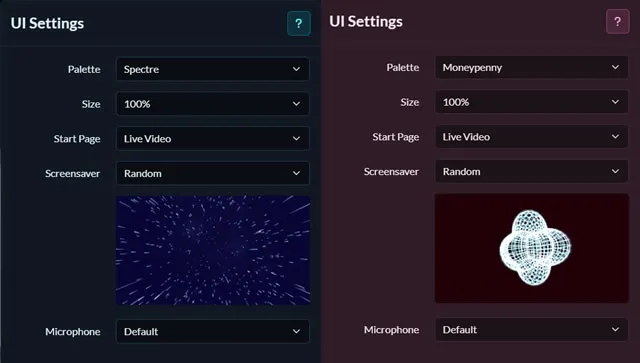
- Palette: Pick a color scheme
- Size: Choose a size. Use this to make things more readable on high resolution devices.
- Start Page: Choose a view to start on: Live, Timeline, Recordings, Photos, Floor plans or Virtual Reality.
- Screensaver: Choose a screensaver. This is displayed when connecting or logging in.
- Microphone: Choose a default microphone to use for talk.
Display Options
- Labels: Toggle object names display on or off in the live view.
- Icons: Toggle icons at the bottom left of each device showing their state (recording, alerts enabled, motion detection enabled, schedule enabled)
- Recording Icon: Toggles the red recording indicator
- FPS Limiter: Limit frames per second in some views to save CPU. Or turn it off for smoother visuals at the cost of some CPU.
- Hide Playback Controls: Auto hide playback controls when viewing recordings.
- Show Clip Info: Pop up information about the clip when playback starts.
- Motion Indicator: Flash border on devices that detect movement or sound.
- Alert Indicator: Flash border on devices that alert.
- Grid: Toggles the display of grid lines in the UI.
- Auto mobile layout: Always use grid layout on mobile devices (only visible on mobile devices).
Audio/ Video Options
- Autoplay Audio: Start playing audio automatically when the interface loads.
- Auto Mute: Stop and start audio playback based on browser tab visibility
Connection Settings
- Use server time: Show event timestamps in the server timezone, or stick with local time
- Local Data: Cache data in the local browser when possible (speeds up the UI)
- Auto reconnect: Automatically reconnect to Agent DVR if the connection is lost
Input Controls
- Shortcut Keys: Toggle shortcut key support
- Joystick: Toggle joystick support
- Invert Controller: Invert the Y-Axis of the Joystick
User Interface
- Confirm: Display Confirm dialog box when performing certain actions (like Delete)